Lusha Pricing: Plans, Credits, and Filters for Finding B2B Contacts
Lusha is a B2B platform for finding contacts and company data. It provides professionals’ email addresses and phone numbers, company information, and signals about important business changes: job changes, headcount growth, and funding rounds.
In this article, we’ll look at the main features and how credits are deducted, then break down Lusha’s plans and pricing.
Key Takeaways
- According to Lusha, its database contains more than 515 million B2B contacts and 29 million company profiles worldwide.
- Plans with monthly billing: Free — $0 (includes 40 credits), Starter — $49 (400 credits), Pro — starting at $69 (600 credits), Premium — starting at $399 (3,400 credits), and Scale comes with custom terms for companies.
- An email costs one credit. You can buy additional credits starting with the Pro plan.
- There are separate filters for companies and contacts, as well as 26 Buying Signals.
- Lusha covers basic search tasks. But compared to Apollo, it has fewer filters for lead segmentation, and search costs more.
When to Use Lusha for Cold Email
To launch a cold email campaign, you need to build and verify a contact list, prepare domains and mailboxes (for example, with Maildoso), set up warm-up, write the emails, and launch the campaign.
Lead search services such as Lusha or Apollo are needed at the first stage. They let you find target companies and professionals, build a contact list, and estimate the size of your database when planning a campaign.
Before you search, define your ICP (ideal customer profile): industry, company size, geography, technologies, and target job titles. In Lusha, search and filters are free, while credits are deducted for revealing contacts. So decide in advance who you’re looking for: the more precisely you describe your audience, the fewer credits go to waste.
Lusha Features for Lead Search
In Lusha, search filters are divided into two categories: Companies and Contacts. You can combine them to find prospects that match your ICP. You can also combine filters with 26 Buying Signals, including funding rounds, new executive appointments, a sharp rise in job postings, headcount reductions, and other changes. This data helps you identify promising leads.
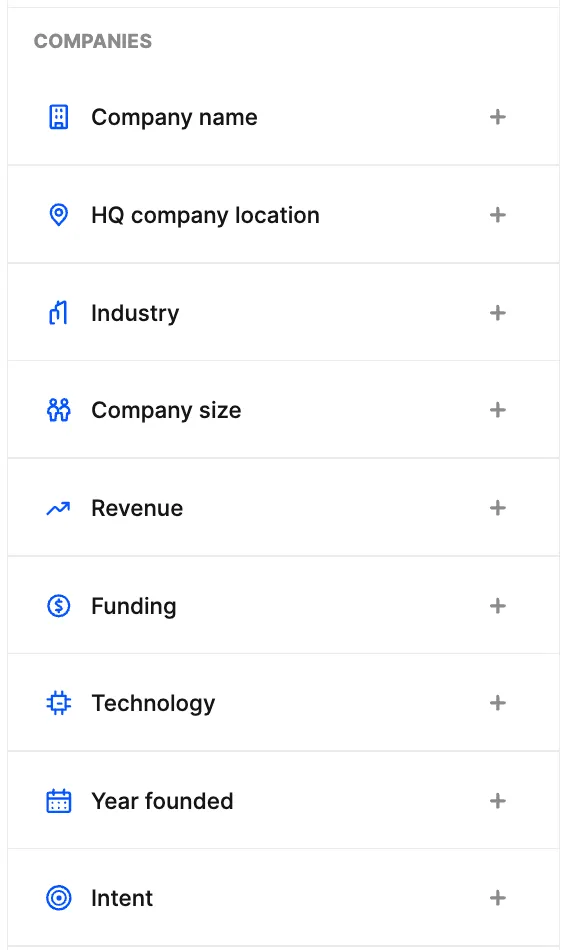
Company Filters
-
Company name: search by name.
-
HQ company location: location of the company’s headquarters, for example, the US or Germany.
-
Industry: the sector the company operates in, for example, SaaS or finance.
-
Company size: number of employees, for example, 1–10, 11–50, 51–200, and so on up to 100,000+.
-
Revenue: annual revenue, for example, $1–10 million.
-
Funding: financing details such as amount, stage, and type of funds raised. For example, you can search for startups that received investment at the Series A stage.
-
Technology: the tech the company uses, for example, Google Analytics, HubSpot, or AWS.
-
Year founded: when the company was founded, for example, after 2020.
-
Intent: signals that help determine which products or services a company may be interested in, for example, Advertising Campaigns.\
Contact Filters
-
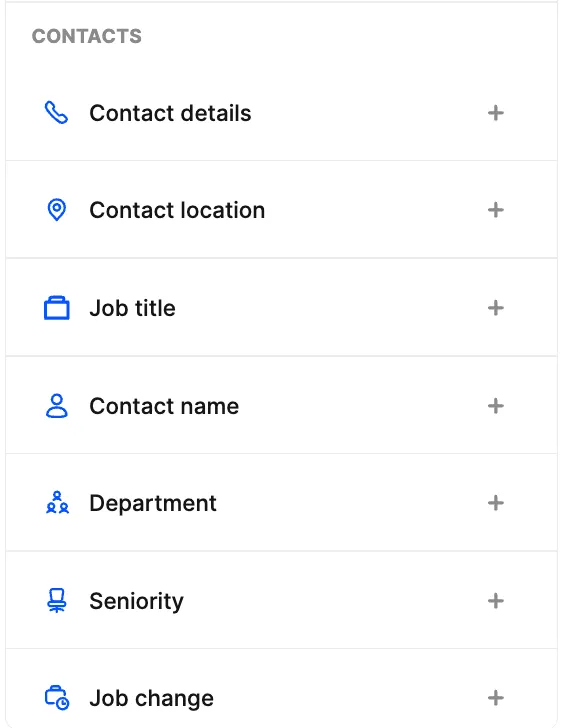
Contact details: how you can reach the person, for example, email and phone number.
-
Contact location: the professional’s location, for example, the United Kingdom.
-
Job title: position, for example, Head of Marketing.
-
Contact name: search by name.
-
Department: the department where the professional works, for example, marketing or sales.
-
Seniority: job level, for example, manager, director, or senior executive.
-
Job change: whether the person recently changed jobs, for example, a recent move to another company.\
When searching for leads, start with company parameters: choose the industry, size, and geography. Then narrow down the job titles, departments, and seniority levels of the professionals you want to offer your product to. Finally, in the Contact Details section, turn on the Exclude contacts without details filter and check the Work email box, so that only people with available email addresses remain.
For example, if you promote SEO services, you can search for marketing directors at US software development companies with 50 to 500 employees, and then keep only those who have an email. With these criteria, Lusha found contacts for 4,601 people:\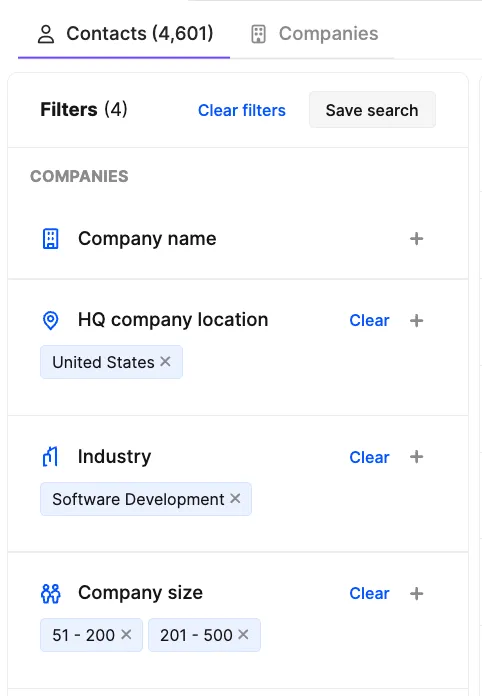 \
To get contacts out of Lusha, save them to a new List, then export it to CSV.
💡Keep in mind that having an address doesn’t guarantee that it’s up to date or that the email will be delivered, so be sure to check emails with a verification service, such as NeverBounce or its alternatives, before sending. Not all found email addresses will make it through, so you may end up with fewer contacts for your campaign than you planned.
Contact data goes stale mainly because people change jobs. According to Lusha’s own research, in a sample of about 140 thousand sales leaders in the US, 12.25% changed their position or company within a year, and 25.67% within two years. On average, that’s about 1% of contacts per month. According to Lusha, how often information is updated depends on its type: contact and company data is checked daily, hiring signals weekly. A change of position or company may appear in the database with a delay.
Lusha Plan Comparison in 2026
Lusha plans differ in price, number of users, and available credits. Let’s compare how much each plan costs and how much it takes to get 100 email addresses with CSV export:
| Plan | Monthly price | Users included | Credits per month | Cost of 100 emails with CSV export* |
|---|---|---|---|---|
| Starter | $49 | 1 | 400 | ~$13 |
| Pro | $69 | 2 | 600 | ~$12 |
| Premium | $399 | 5 | 3,400 | ~$12 |
*Estimated cost. Assumes that 1 credit is spent on finding one address, and another 1 credit is spent on exporting every 25 contacts.
What Are Credits Spent On?
Credits are Lusha’s internal currency. They are spent on getting contact data (1 email address is 1 credit, a phone number is 5 credits, and CSV export is 1 credit for every 25 contacts or companies), enriching contact and company data, AI-powered search, getting buyer intent data, and some API operations. Search itself and viewing results are free.
Free
Price: $0
Users: 1
Credits: 40 per month
Available features: verified email addresses and phone numbers (for credits), filters for searching contacts and companies, company data, automated email sequences, call recordings and AI analytics, a browser extension, and CRM integrations. This plan is suitable for getting to know the service before buying a paid subscription: paid plans don’t have a free trial.
Starter
Price: $49 per month
Users: 1
Credits: 400 per month. If you spend all your credits only on getting email addresses, you can get up to 400 addresses. In that case, the estimated cost of 100 addresses, including CSV export, comes to $13. If you run out of credits, you’ll have to wait for the next billing period to start or upgrade to a more expensive plan: you can’t buy additional credits on Starter.
Available features: everything in Free, plus lookalike search for contacts and companies (Lookalikes: Lusha finds new leads similar to your best customers), an AI assistant (builds lead lists from a description in plain language), and Buying Intent tracking for 5 topics.
👉 Maildoso’s take: we don’t recommend the Starter plan. It’s only $20 cheaper than Pro, but you get just 400 credits, which isn’t enough for a full campaign. On top of that, 100 addresses cost more on Starter: $13 vs. $12 per 100 addresses when you factor in export, and you can’t buy additional credits. For $69, Pro gives you 600 credits, a second user, and the ability to buy additional credits.
Pro
Price: $69 per month
Users: 2. Each additional user is $49 per month.
Credits: 600 per month. If you spend all your credits only on getting email addresses, you can get up to 600 addresses, and the estimated cost of 100 addresses, including CSV export, is $12. If the credits included in the plan run out, you can buy additional ones: every 200 credits cost $22.50.
Available features: everything in Starter, plus API access, CSV enrichment (up to 300 rows at a time), Signals, and webhooks: automatic notifications that send information about contacts’ job changes and company events to connected systems, such as a CRM.
Premium
Price: $399 per month
Users: 5. Each additional user is $49 per month.
Credits: 3,400 credits per month. If you spend all your credits only on getting email addresses, you can get up to 3,400 addresses, and the estimated cost, including CSV export, is $12.
Available features: everything in Pro, plus API Advanced, CSV enrichment (up to 500 rows at a time), team management and credit allocation among team members, and tracking company interest in 5 topics with no limit on the number of results.
Scale
Price: custom, for large companies
Credits: custom limit
Available features: everything in Premium, plus a discount of 50% or more on credits, single sign-on (SSO), buying intent tracking for 25 topics with no limit on the number of results, CSV enrichment (up to 10,000 rows at a time), advanced security settings, a dedicated manager, and priority support. The plan is available on request through the sales team.
All paid Lusha plans are available with annual billing: with a 12-month commitment, a 25% discount applies, and all credits for the year are granted upfront. The Scale plan is also contracted for a year.
Additional Credits in Lusha
According to Lusha’s support team, additional credits can only be bought on the Pro, Premium, and Scale plans (this option isn’t available on Starter). Credits are sold in blocks of 200, and one block costs $22.50. That means 400 additional credits cost $45, 600 cost $67.50, and so on. If you use additional credits only for getting email addresses, the estimated cost of 100 addresses, including CSV export, comes to $11.70.
Important Terms for Using Additional Credits in Lusha
How many additional credits can you buy? On the Pro plan, the total monthly limit can be increased to 3,200 credits, and on Premium, to 10,000 credits. If that’s still not enough, you can either buy another Pro or Premium subscription (though working from two accounts will most likely be less convenient) or switch to the Scale plan with custom terms. But it’s only available with annual billing, so for a one-time limit increase, this option may not be practical. For comparison: in Apollo, you can buy up to 50,000 additional credits for $800 per month.
What Happens to Unused Credits?
- Monthly billing: the remaining balance rolls over to the next month. However, your account can hold no more than two monthly limits. For example, with a limit of 600 credits per month, the maximum balance is 1,200 credits.
- Annual billing: all credits are granted upfront for the year, but any unused balance doesn’t roll over to the next year after the subscription is renewed.
How do you turn off additional credits? Additional blocks renew monthly along with the subscription. You can’t turn them off separately. If you no longer need them, turn off subscription renewal in Account & settings → Payments & Subscription. At the end of the paid period, the account will switch to Free, the remaining credits will be lost, and you’ll be able to sign up for a new plan with the volume you need.
Pro or Premium: Which Lusha Plan Is the Better Value for High-Volume Search?
Starter is only for trying out what Lusha can do: it has just 400 credits, and you can’t buy additional ones. For regular contact search, you’ll need to move up to Pro or Premium.
Pro costs $69 per month and includes 600 credits. With additional blocks of 200 credits for $22.50, you can increase the monthly limit to 3,200 credits. At the maximum limit, the total cost comes to $361.50 per month, and the estimated cost of 100 email addresses (including CSV export) is $11.75.
Premium costs $399 per month for the base package of 3,400 credits. If that’s not enough, you can gradually increase the limit by buying blocks of 200 credits for $22.50, up to 10,000 credits per month. At the maximum limit, monthly spending comes to $1,141.50, and the estimated cost of 100 email addresses, including export, is $11.87.
It turns out that credits cost roughly the same on both plans, and there’s no discount for buying a larger volume. In that case, Premium only makes sense if you need to process more than 3,200 leads per month. Two Pro subscriptions with the maximum number of additional credits give a total of 6,400 credits and cost $723 per month, while Premium with a limit of 10,000 credits costs $1,141.50. The price per credit is almost the same (about $113–114 per 1,000), but Premium is a single account with up to five users.
How Much Does It Cost to Find 10,000 Leads with Lusha: A Calculation Example
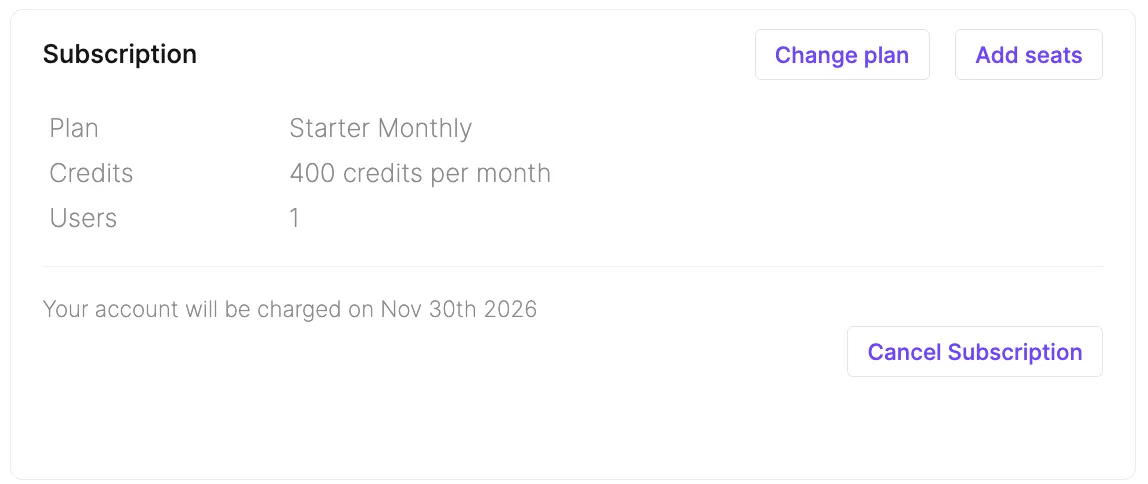
Let’s take a Maildoso use case. Maildoso’s customers include lead generation agencies, so we decided to find their founders in the US, Canada, and the UK. For the test, we bought a monthly Lusha Starter subscription for $49:\
Then we applied the following filters:
- company keywords: lead generation, lead gen, B2B lead generation, sales prospecting, business development;
- company size: 1 to 200 employees;
- job titles: Founder and Co-Founder;
- seniority: Founder;
- company location: US, Canada, UK.
In the Contact Details section, we checked Exclude contacts without details and Work email. These filters returned 10,065 contacts with available email addresses:
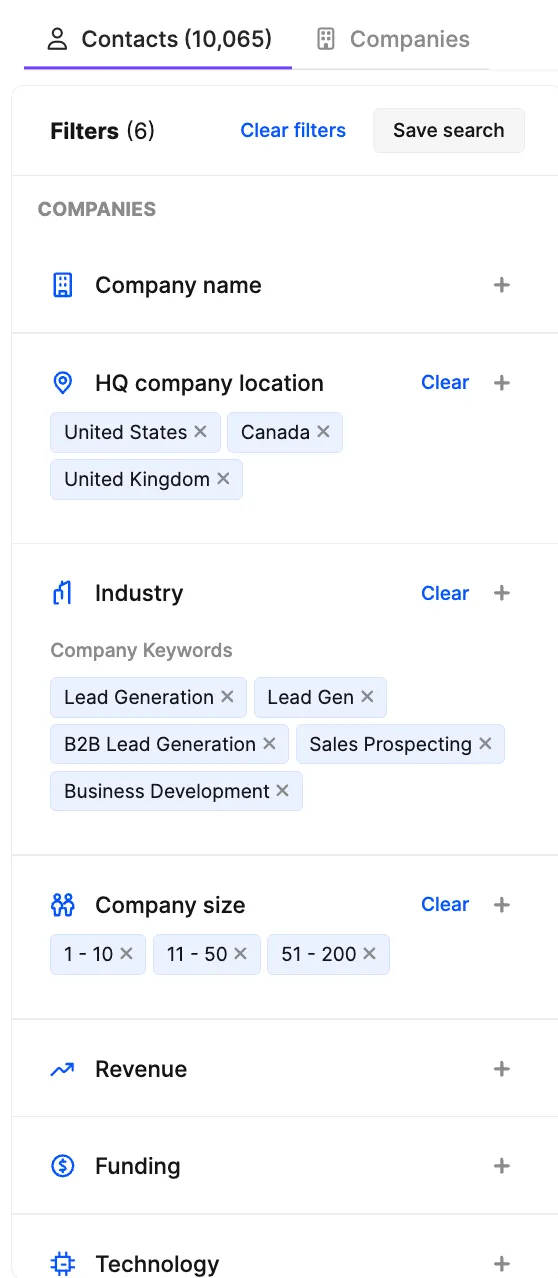
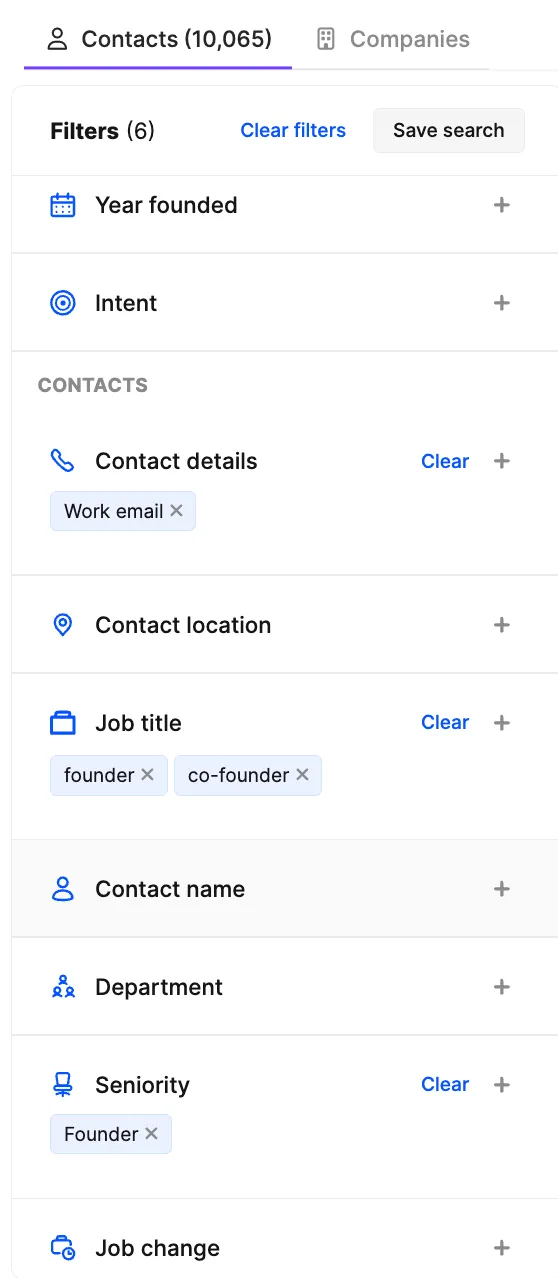
Lusha doesn’t have a ready-made “lead generation agencies” segment, but you can build the audience with keywords: Lead Generation, B2B Lead Generation, and others. This gives you control: you decide who counts as your target audience instead of choosing from broad categories like “marketing” or “sales”. But keep in mind that the search is based on how companies describe themselves in their profiles, so it’s worth using several keyword variations (for example, in our case, agencies that position themselves as a growth agency or appointment setting may also be worth searching for). Ask an AI tool to help you generate different keyword variations, then check 10–15 companies from the search results. If many of them don’t fit, try searching with other keywords.
Now let’s calculate the approximate cost of getting all the email addresses found with our filters. On Starter and Pro, the credits won’t be enough for this task, so let’s go straight to Premium.
Premium costs $399 per month and includes 3,400 credits. The maximum limit is 10,000 credits: to reach it, you need to buy 33 blocks of 200 credits for $742.50. That comes to $1,141.50 per month for 10,000 credits. For comparison, Apollo lets you get up to 12,500 leads for about $245 per month, almost five times cheaper.
→ Read our detailed breakdown of Apollo’s pricing, limits, and features in a separate article.
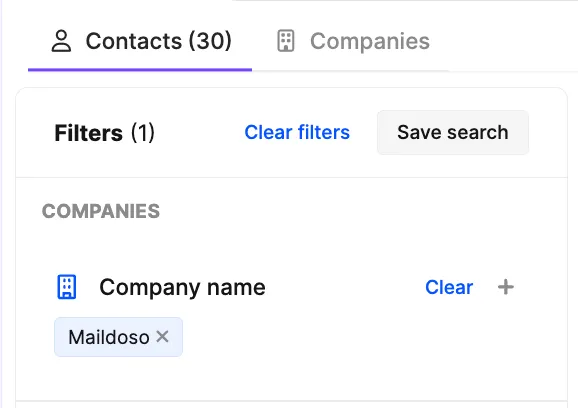
Additionally, we checked how many Maildoso employees are in the Lusha database. The service found 30 profiles. At first glance, that looks like almost the entire team, but after verification we were able to confirm that only 15 of those profiles belong to current employees of the company. This suggests that Lusha’s database may include not only current employees but also people who used to work at the company or worked with it. So the contacts you find should be verified separately.\
Email Verification with Bouncer
Having an email address in a database doesn’t mean it’s up to date or suitable for sending. So we decided to check the quality of Lusha’s data on a sample of 100 contacts using Bouncer.
After running 100 Lusha email addresses through Bouncer, the service considered 89 addresses deliverable (Deliverable), marked 7 as Risky, and found 3 Undeliverable, meaning emails to these addresses are likely not to be delivered.
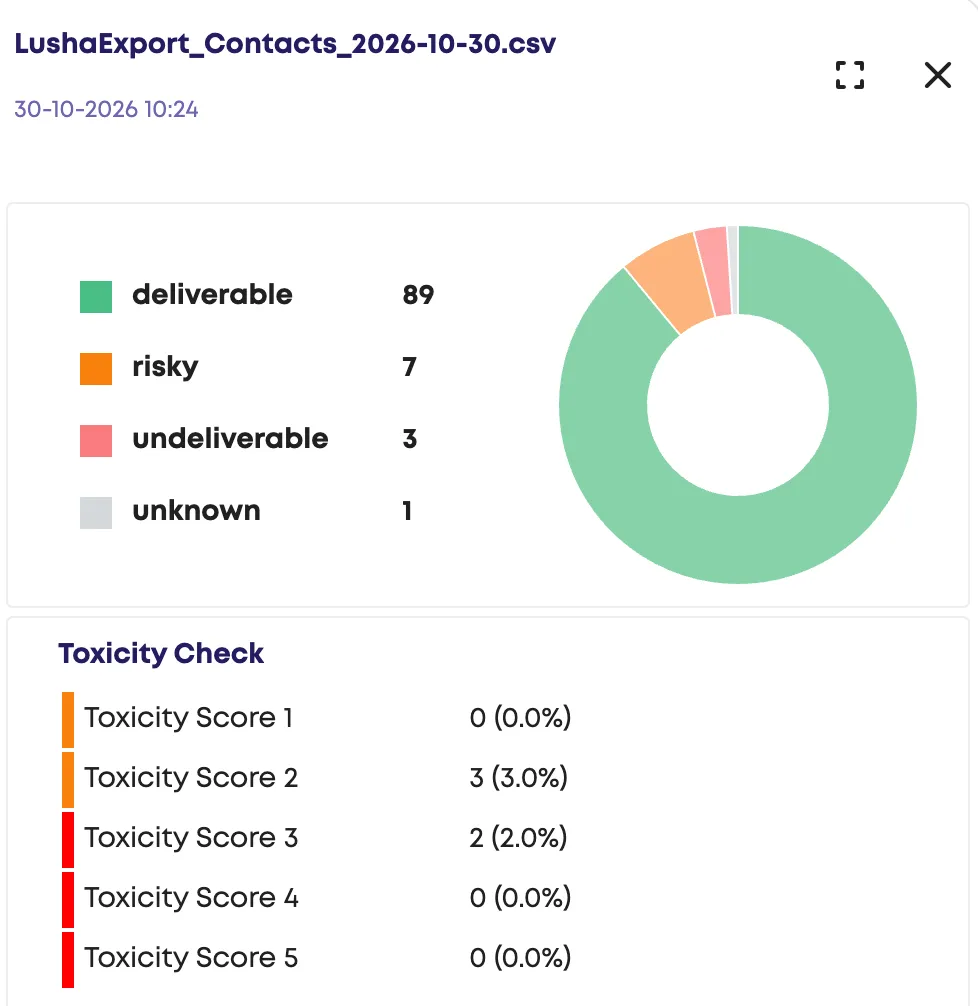
The Bounce Estimate, which is the projected share of emails that may bounce back to the sender as undelivered, came in at 5.7%.\
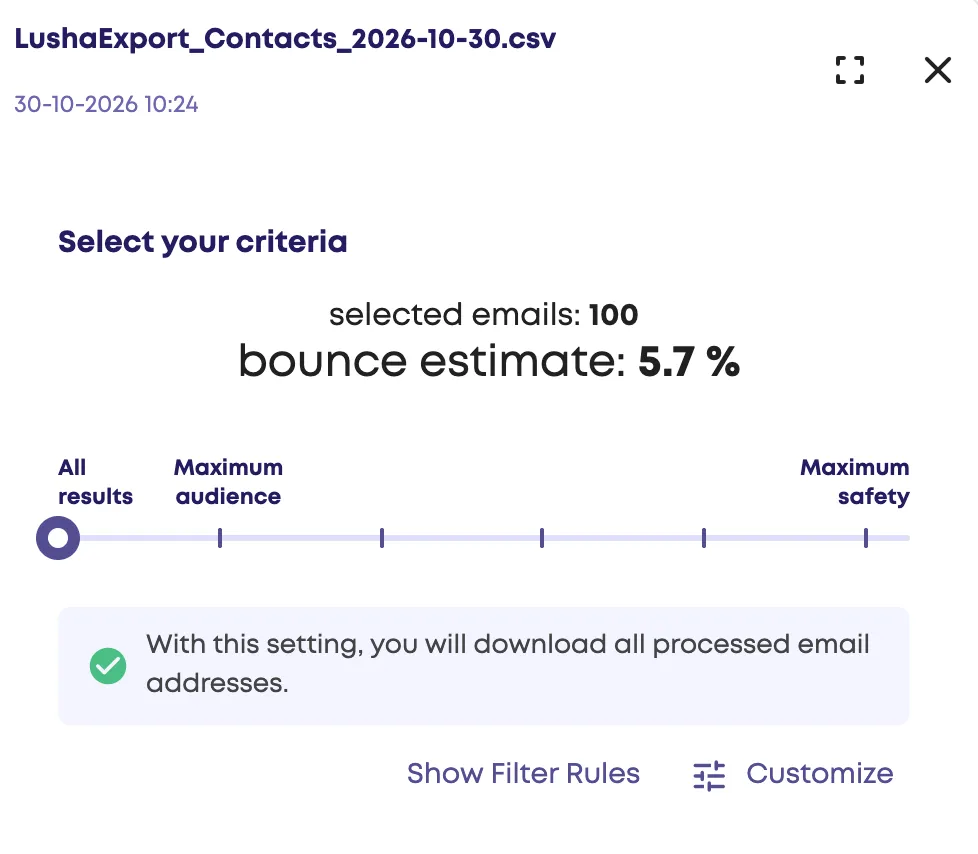
Overall, the results of our check of email addresses from Lusha turned out to be quite good and comparable to the results of the Apollo test. For comparison, with the same check on Snov.io’s database, the Bounce Estimate was 22.5%. And although a sample of 100 contacts doesn’t allow us to draw conclusions about the quality of all addresses in these services’ databases, we still strongly recommend verifying the contacts you find with an external verifier: an additional check helps you assess potential risks before sending.
Conclusion
Lusha, like Apollo, is a good fit for targeted work, when you need to quickly pull contacts for a few dozen professionals. The quality of the email addresses in our test was comparable to Apollo’s, and the sets of filters are also similar, but the price is noticeably higher: Lusha credits cost roughly 4-5 times more.
The service is much less cost-effective for bulk search: the basic plans have few credits, and the cost per contact is high. Moving to a more expensive plan doesn’t change the situation: the cost of getting email addresses on Premium is about the same as on Pro, and buying additional credits comes with hard caps: on Pro, you can get no more than 3,200 credits per month, and on Premium, no more than 10,000. For many campaigns, that’s not enough, and higher limits require a subscription to the Scale plan, which means paying for a full year upfront. Having compared Lusha with Apollo, we came down in favor of the latter.
→ For other tools for finding B2B contacts, read our separate article (link)\
FAQ
How much does Lusha cost?
The paid plans Starter, Pro, and Premium cost $49, $69, and $399 per month, respectively. For large companies, Scale is available with custom terms.
Can you buy additional credits in Lusha?
Yes, but only on the Pro plan and above. On Pro, additional credits are sold in blocks of 200 for $22.50. There are limits on the total monthly volume: on Pro, it can be increased to 3,200 credits, and on Premium, to 10,000.
Do unused Lusha credits roll over?
It depends on the billing type. With monthly billing, unused credits, including additional ones, carry over to the next month, but the total balance can’t exceed twice the monthly limit. With annual billing, all credits are granted upfront for the year, and any balance left at the end of the term expires.
How do you check the quality of contacts from Lusha?
Before sending, verify email addresses with a verification service, such as NeverBounce. Having an address in Lusha doesn’t guarantee that it’s up to date or that your emails will be delivered.