Apollo Pricing and Plans: What’s the Best Option for Cold Email?
Apollo is a B2B contact database: you can search for companies and decision-makers, filter them by the parameters you need, and get their contact details. The platform runs on a per-user subscription and a credit system, so the final price depends not only on the plan but also on how many contacts you unlock.
We’ve already covered How to Use Apollo to find leads for cold email. In this article, we’ll break down how Apollo’s plans differ, how credits work, and which plan to choose based on your team size, campaign volume, and the tasks you plan to use the platform for.
Key Takeaways
- Apollo offers four plans: Free, Basic at $65 per month, Professional at $99, and Organization for teams at $119 (minimum 3 seats).
- The estimated cost of 1,000 email addresses is about $26 on Basic and $24.75 on Professional.
- You can buy additional credits without moving to a more expensive plan, starting at $10 for 400.
Apollo’s Features for Building a Lead Database
Apollo lets you find prospects’ contacts, launch email sequences, run multichannel outreach, and analyze calls with AI. For cold email, Apollo’s main advantage is its large B2B contact database and flexible filters for finding your target audience:
Company and people search. Apollo lets you find companies and specific employees within them, including decision-makers.
Lead search filters. You can select contacts by job title, industry, company size, location, and other parameters to build a list of prospects.
Contact data search. The platform helps you find work email addresses and phone numbers.
Contact export. You can export contacts to a CSV file for an email validator or a sequencer.
Apollo Plan Comparison in 2026
Apollo offers four plans: Free, Basic, Professional, and Organization. They differ in features and in the number of credits added each month. Credits are Apollo’s internal currency.
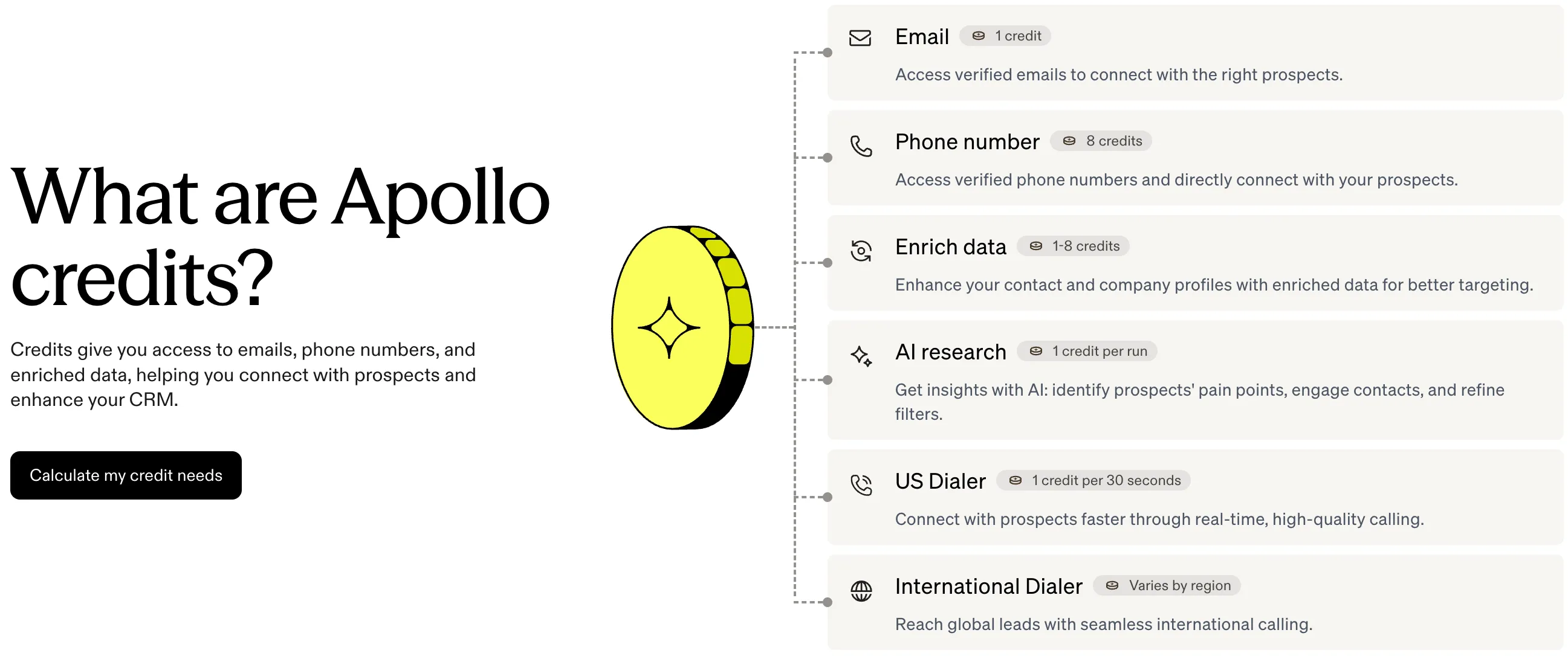
💡 What are credits and how are they spent? Credits are Apollo’s internal currency. They’re deducted when you look up contact data and use other platform features. For example, getting an email address costs 1 credit, and a phone number costs 8 credits. Other actions, such as data enrichment, can also use credits.
At the start of each billing period, Apollo adds new credits, and unused credits from the previous period expire.
Plans can be paid monthly or annually, and prices differ. Although Apollo advertises 20% savings on annual plans, at Maildoso we don’t recommend switching to annual plans right away.
You can connect multiple users to Apollo. All team members must be on the same plan, and their credits are combined into a shared pool.
Compare the main plan features with monthly billing. Prices are per user:
| Plan | Price per month | Credits per month | Cost per 1,000 email addresses* |
|---|---|---|---|
| Basic | $65 | 2500 | ~$26 |
| Professional | $99 | 4000 | ~$24.75 |
| Organizational | $119 per user, 3 users minimum, paid yearly | 6000 | ~$19.83 |
*The cost of 1,000 email addresses is approximate: the calculation assumes that each address costs 1 credit and that all credits are spent only on getting emails.
Free: To Get Acquainted with the Service
Price: free
Suitable for testing contact search. Includes only basic filters and 75 credits per month.
Basic: For Regular Lead Search
Price: $65/mo
Trial: yes, 14 days
Credits: 2,500 credits per month. If you spend all credits only on email addresses, 1,000 addresses will cost about $26.
Available features: advanced search filters, Waterfall Enrichment for enriching data from multiple sources, AI Research for researching leads, and AI Writing (up to 250,000 words per month). You also get email sending and automated email sequences, mailbox warm-up, meeting recording with AI analysis (up to 150 minutes per month), and 3 Meeting Events in the Apollo calendar. Record selection limit: 1,000 records.
💡 What is a record selection limit? Apollo records include contacts and companies. The limit determines how many records you can select in one action, for example, when adding them to a list. The higher the limit, the fewer actions you need to build a large database.
Professional: For Active Sales
Price: $99/mo
Trial: yes, 14 days
Credits: 4,000 credits per month. If you use all credits only for email addresses, 1,000 addresses will cost about $24.75.
Available features: includes all Basic features, including Waterfall Enrichment and Email Warmup. The limit for meeting recording with AI analysis increases to 4,000 minutes per month. You also get agents for task automation and A/B testing for email sequences. Meeting Events: up to 6. Selection limit: up to 2,500 records.
Organization: For Teams with a High Volume of Contact Search
Price: $119/mo per user. Minimum number of users: 3. Billed annually in one payment ($4,284 for 3 users)
Trial: no
Credits: 72,000 credits per year per user (equivalent to 6,000 per month) and up to 10,000 records per action. If you use all credits only for email addresses, 1,000 addresses will cost about $19.83.
Available features: includes the features of the previous plans, higher limits for recording and AI meeting analysis, plus additional team tools and advanced security settings—selection limit: 10,000 records.
The main difference between Organization and the previous plans is higher limits and enterprise features. But not every team needs all of that. In our opinion, Professional is the smarter choice: you can pay monthly and add as many users as you need without the three-seat minimum.
Additional Credits
If your current plan’s features are enough but you’re short on credits, you can buy more separately without moving to a more expensive plan. Additional credits are paid for in your account: Admin Settings → All Settings → Credit Usage → Add More Credits. The price depends on the number of credits:
| Additional credits | Extra charge | Cost per 1,000 email addresses* |
|---|---|---|
| +400 | $10 | $25 |
| +1000 | $25 | $25 |
| +2500 | $50 | $20 |
| +5000 | $100 | $20 |
| +10 000 | $180 | $18 |
| +20 000 | $320 | $16 |
| +50 000 | $800 | $16 |
💡Please note: additional credits are not a one-time purchase. They renew automatically along with your subscription until you turn them off. Unused credits expire at the end of the billing period.
💡💡Account for email verification. After verification, some addresses may be invalid, so you’ll have fewer contacts left for your campaign. Find extra contacts as a buffer.
→ Read more about how to use Apollo for cold email in our guide: How to Use Apollo for Cold Email: A Simple Guide
How Much Does It Cost to Find 12,000 Leads with Apollo: A Sample Calculation
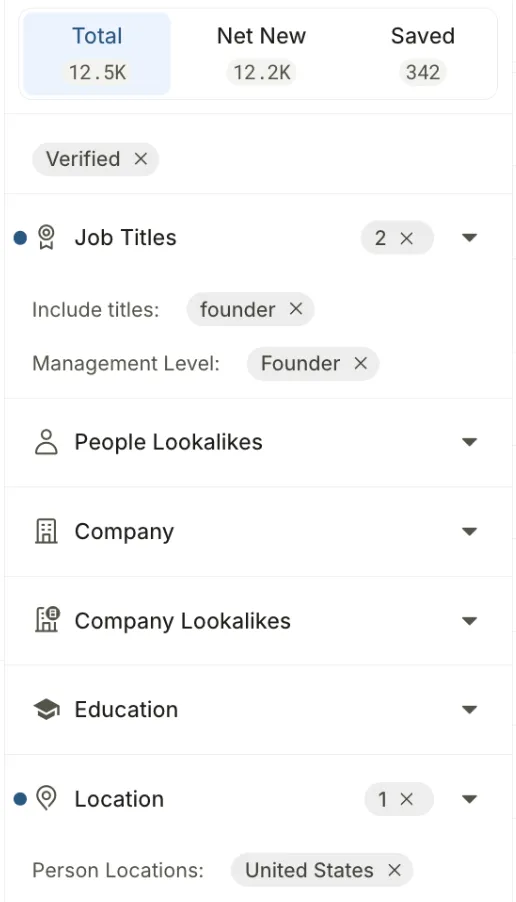
Let’s take a Maildoso task as an example. Our clients include lead generation agencies. In Apollo, we found about 12,500 founders of lead generation agencies in the US with verified email addresses:
Let’s calculate the cost of building the database with Apollo:
- Basic plan (2,500 credits included): $65/mo.
- Additional 10,000 credits: $180/mo.
Total: $245 per month.
Of course, this isn’t the only cost of cold email. Before launch, you need to verify the email addresses with a verification service (for example, NeverBounce), buy mailboxes and domains (for example, from Maildoso), and then connect them to a sequencer (for example, Instantly).
→ We broke down the full cold email budget in this article: How Much Does It Cost to Launch a Cold Email Campaign with Maildoso?
What’s More Cost-Effective: Apollo or Alternatives?
Let’s compare the entry-level plans of Apollo, Hunter, and Lusha, other services for finding B2B contacts, by plan price, number of available credits, and approximate cost of 1,000 email addresses with standard search:
| Service | Plan | Price per month | Monthly credit limit | Cost per 1,000 email addresses |
|---|---|---|---|---|
| Apollo | Basic | $65 | 2500 | ~$26 |
| Hunter | Starter | $49 | 2000 | ~$24.5 |
| Lusha | Starter | $49.90 | 400 | ~$124.75** |
**Additional credits are paid separately, so that the actual cost may differ.
Apollo combines contact search, lead filtering, cold email, and AI-powered calls. Hunter focuses more on finding and verifying emails, while Lusha focuses on contact data, including phone numbers.
Comparing the entry-level plans of Apollo and Hunter, 1,000 email addresses cost about the same. Lusha’s entry-level plan includes significantly fewer credits, and buying additional credits increases costs substantially. But unlike Hunter and Apollo, Lusha lets you roll over unused credits to the next month, up to a set limit.
Final Thoughts: A More Expensive Plan or Additional Credits?
Apollo combines lead search, data enrichment, cold email, and mailbox and domain purchases. But you don’t have to use everything in one platform. It’s often more cost-effective to build your cold email infrastructure with Maildoso and warm up mailboxes in Instantly. This way, you can save money and use the best tool for each task instead of depending on a single platform.
At Maildoso, we don’t recommend paying for Apollo annually right away, despite the advertised 20% savings. First, use the service for at least a month, evaluate the costs and results, and then make a decision. To start, we recommend the Basic plan and buying additional credits as needed. This way, you can control your spending and avoid overpaying for features you don’t need.
FAQ
Does Apollo have a free trial?
Yes, Apollo offers a 14-day trial on the Basic and Professional plans. That’s enough to test the service, explore the filters, and build a test contact database.
Can I switch to a different plan later?
You can upgrade to a more expensive plan at any time, but you can usually switch from annual to monthly billing only after the paid period ends.
Do unused Apollo credits expire at the end of the month?
Yes, Apollo credits refresh at the start of each billing period, and any unused balance expires.
What happens if I run out of credits before the end of the month? Can I buy more without changing my plan?
Yes, on paid plans. Additional credits renew automatically, and the balance expires at the end of the billing period. To avoid charges, reset your additional limit to zero before renewal.